Ultrabooks vs Traditional Laptops: Which One Actually Makes Sense for You?
This article is part of our comprehensive guide on Computers, Laptops, and Accessories. For more laptop buying advice, check out the complete resource.
I bought an ultrabook in 2019 thinking I’d finally solved my “lugging a brick to coffee shops” problem. Spoiler: I returned it three weeks later and went back to my chunky Dell.
Here’s the thing nobody tells you upfront. Ultrabooks look amazing in YouTube reviews. They’re thin. They’re light. They make you feel like a minimalist tech genius. But the moment you try to run anything more demanding than Chrome with 12 tabs, you start questioning your life choices.
I’m not saying ultrabooks are bad. I’m saying the marketing makes them sound perfect for everyone, and they’re really not. Let’s talk about what these things actually are and who should buy them.
What Even Is an Ultrabook?
Intel coined the term “ultrabook” back in 2011, and it basically means a laptop that’s stupid thin and stupid light. We’re talking under 0.8 inches thick and usually around 3 pounds or less.
Traditional laptops? They don’t care about your Instagram aesthetic. They’re usually 1+ inches thick, weigh 4-6 pounds, and prioritize performance over looking sleek in a coffee shop.
The real difference isn’t just size, though. It’s what you’re giving up to get that size.
The Performance Reality Check
Let me save you some pain I learned the hard way.
Ultrabooks use low-power processors. Usually something in Intel’s U-series or Y-series, or AMD’s equivalent. These chips are designed to sip battery, not crush workloads. They’re fine for web browsing, documents, and light photo editing. But if you’re compiling code, editing 4K video, or running virtual machines, you’ll hear that fan spin up and watch your performance tank.
Traditional laptops typically pack H-series or HX-series processors. These are the same chips you’d find in gaming laptops or workstations. They consume more power, generate more heat, and deliver way more performance when you need it.
I ran a simple test last year: exporting a 10-minute 1080p video in Premiere Pro. My friend’s ultrabook took 28 minutes. My traditional laptop (with an H-series i7) finished in 11 minutes. That’s not a small difference when you’re working against deadlines.
Looking for raw performance? Check out our guide on best computers for video editing to see what specs actually matter.
Battery Life: The Great Trade-off
This is where ultrabooks shine. No joke.
My current ultrabook (yeah, I bought another one, don’t judge) gets 10-12 hours of actual work. Not “if you dim the screen and don’t open anything” battery life. Real battery life with Slack running, 20 Chrome tabs, and Spotify streaming.
Traditional laptops? You’re looking at 4-6 hours if you’re lucky. My old gaming laptop needed to be plugged in after 90 minutes. It wasn’t even portable at that point.
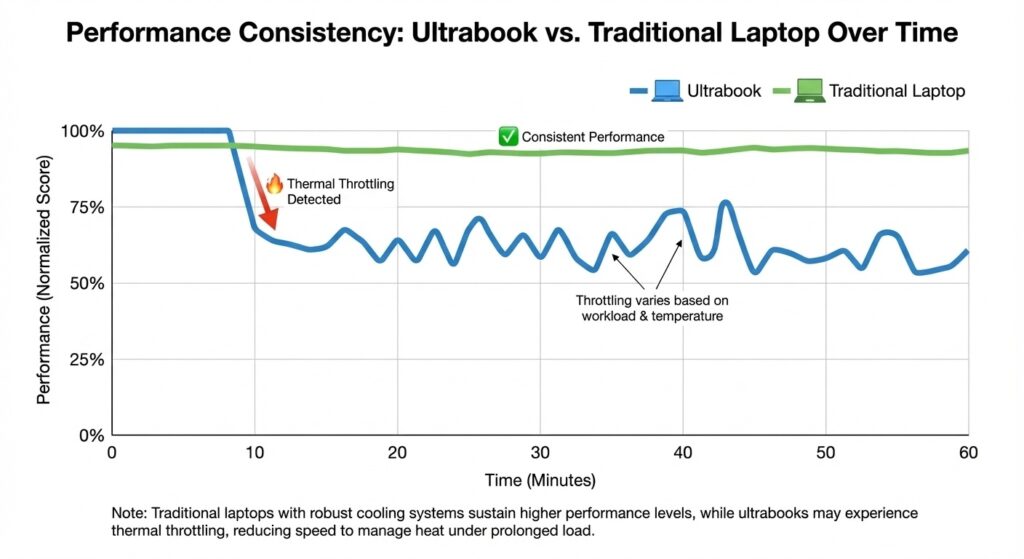
But here’s the catch: ultrabooks achieve this by throttling performance when unplugged. Your CPU won’t boost as high. Your GPU (if you even have a dedicated one) will run slower. It’s great for battery life, terrible if you need consistent performance.
Portability vs Practicality
I travel a lot for work. And I’ve done the math on this probably too many times.
Carrying a 2.8-pound ultrabook vs a 4.5-pound traditional laptop sounds like a big deal. It is. Your shoulder will thank you after a day at a conference or walking through an airport.
But portability isn’t just about weight. It’s about what you can actually do when you get where you’re going. If you arrive at your destination and can’t run the tools you need, you’ve just carried an expensive paperweight.
I know developers who swear by ultrabooks and remote into beefy desktop machines for heavy work. Smart compromise. But if you don’t have that option, think carefully about whether those saved pounds are worth the performance hit.
The Keyboard and Cooling Problem
Let’s talk about something reviewers gloss over: thermals and typing.
Ultrabooks are thin. This means less space for cooling. When you push these machines hard, they get hot. Really hot. And because there’s no room for proper cooling, they thermal throttle. Your performance drops to prevent damage.
I had an XPS 13 that would hit 95°C running Docker containers. The keyboard was almost too hot to touch. Not ideal.
Traditional laptops have more room for heat pipes, larger fans, and better airflow. They run cooler under load, which means more consistent performance. If you’re doing anything CPU-intensive for extended periods, this matters more than you think.
Want to keep your laptop running cool? Our article on laptop cooling solutions has practical tips that actually work.
Keyboards are another thing. Ultrabooks use shallow, chiclet-style keyboards because there’s no room for key travel. If you type all day, this can be brutal. I get hand fatigue after a few hours on most ultrabooks.
Traditional laptops can fit deeper, more comfortable keyboards. Not as important if you’re a casual user, but if you’re writing code or documents for 6+ hours a day, you’ll feel it.
Ports: The Dongle Life Is Real
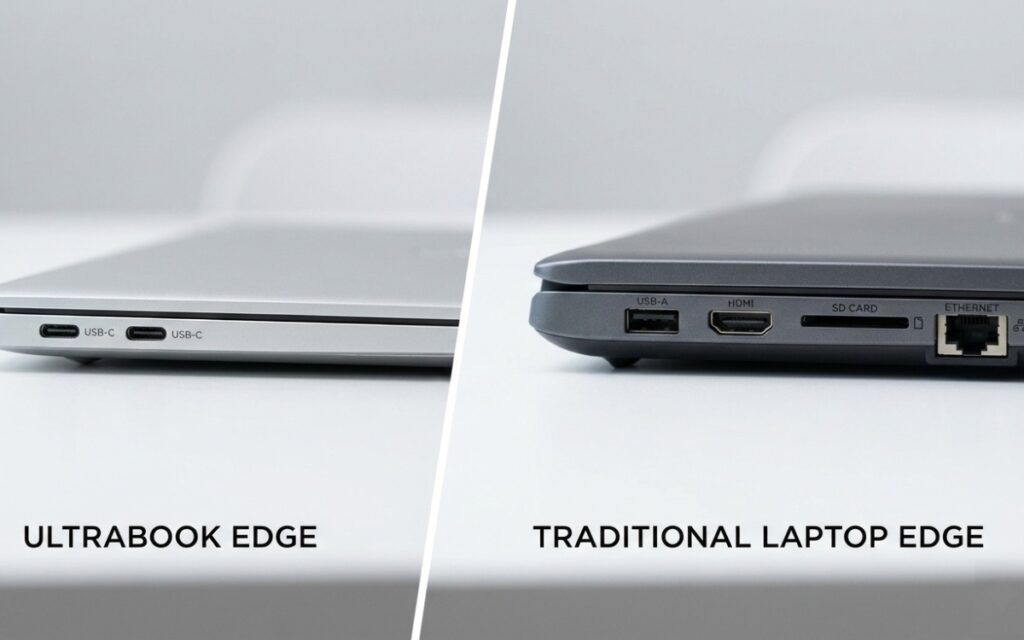
Here’s what annoyed me most about my first ultrabook: I needed a dongle for everything.
One USB-C port. That’s it. Want to plug in a mouse while charging? Dongle. Need to connect to a projector? Dongle. External monitor and charging at the same time? Better dongles or a dock.
I had a bag full of adapters that cost $150+ just to use my “portable” laptop. Ridiculous.
Traditional laptops still have USB-A ports, HDMI, SD card slots, and sometimes even Ethernet. You can actually plug things in without planning your entire setup around adapter compatibility.
If you’re serious about portability, check out best laptop backpacks that have room for all those dongles you’ll inevitably buy.
Upgradeability: Good Luck
Want to upgrade the RAM in your ultrabook? Can’t. It’s soldered to the motherboard.
Storage? Maybe, if you’re lucky and it uses a standard M.2 drive. But some ultrabooks have proprietary storage that you can’t swap out.
Traditional laptops usually let you upgrade RAM and storage. Some even let you swap the battery or add a second drive. This means your laptop can grow with your needs instead of becoming obsolete in two years.
I upgraded my ThinkPad from 8GB to 32GB RAM for $120. Try doing that with a MacBook Air.
Price: You’re Paying for Thin
Ultrabooks are expensive. You’re paying a premium for miniaturization and design.
A traditional laptop with equivalent specs will cost 20-30% less. Sometimes more. That XPS 13 I mentioned? $1,400. A Lenovo with similar performance but traditional form factor? $950.
You’re literally paying extra to get less cooling, fewer ports, and no upgradeability. Make sure the portability is worth it for your use case.
So Which One Should You Buy?
Real talk: it depends on what you actually do with your laptop.
Get an ultrabook if:
- You travel constantly and need all-day battery life
- Your workload is mostly web, email, documents, and light media
- You work in coffee shops or tight spaces regularly
- You have a desktop or cloud setup for heavy tasks
- Portability genuinely matters to your daily workflow
Get a traditional laptop if:
- You run demanding applications (video editing, 3D rendering, gaming)
- You need consistent performance, plugged in or not
- You value ports and don’t want to live the dongle life
- You want to upgrade components down the road
- You care more about performance per dollar than looks
I currently own both. My ultrabook is for travel and client meetings. My traditional laptop stays on my desk for actual work. It’s not an either/or if you can swing it.
My Actual Recommendation
If you’re a student or remote worker doing typical office tasks, an ultrabook makes sense. The battery life and portability are genuinely useful.
If you’re a developer, creative professional, or do anything computationally heavy, get a traditional laptop. The performance difference is too significant to ignore. Your time is worth more than the weight savings.
And honestly? Don’t believe the hype about ultrabooks being “good enough” for everything. They’re not. They’re excellent at specific things and mediocre at others. Figure out which category your work falls into before you drop $1,500 on something that looks pretty but can’t handle your workload.
Still not sure what laptop fits your needs? Our desktop computers buying guide might make you reconsider whether you even need a laptop at all.
Final Thoughts
I’ve used both types of laptops for years now. The right choice isn’t about which one is “better.” It’s about which compromises you’re willing to make.
Ultrabooks sacrifice performance, cooling, and ports for portability and battery life. Traditional laptops do the opposite. Pick your priorities, test them in person if possible, and don’t trust YouTube reviews from people who got the laptop for free.
And whatever you buy, get a warranty. Both types break. But at least traditional laptops are easier to repair.
Want to optimize whichever laptop you choose? Our guide on laptop performance optimization has tips that actually work without downloading sketchy software.