Cloud Computing for Small Businesses: Real Talk from Someone Who’s Been There
This article is part of our comprehensive guide on Artificial Intelligence and Machine Learning. For the full guide and related tech topics, check out the main resource.
Look, I’m going to save you from the mistake I made three years ago.
I was consulting for a small marketing agency (12 people, struggling with an ancient on-premise server), and they asked me about “moving to the cloud.” I gave them the usual spiel about scalability and cost savings. What I didn’t tell them? The actual chaos that comes with migration.
Six weeks later, they’d lost access to three years of client files because someone forgot to check file permissions during the AWS S3 migration. Don’t be that person.
What Cloud Computing Actually Means (Without the Buzzwords)
Here’s the thing: “cloud computing” sounds fancy, but it just means you’re renting someone else’s computers instead of buying your own. That’s it.
Instead of having a server sitting in your office closet (yes, I’ve seen this), you’re using servers from companies like AWS, Google Cloud, or Microsoft Azure. You pay monthly. They handle the hardware. You focus on your actual business.
Sounds great, right? It is. But there are catches nobody mentions in the sales pitch.
Why Small Businesses Actually Need This
I’ll be honest with you. Not every small business needs to go full cloud. But here’s when it makes sense:
Your team is remote or hybrid. If people need to access files from home, coffee shops, or client sites, cloud storage beats emailing files back and forth. Trust me on this.
You’re tired of backup anxiety. Remember that feeling when your laptop died and you weren’t sure if everything was backed up? Cloud services handle that automatically. Well, most of the time. (More on that later.)
You need tools you can’t afford to buy outright. Why drop $2,000 per person on Microsoft Office licenses when you can pay $12/month for Microsoft 365? The math gets real obvious real fast.
You’re growing (or might shrink). Cloud scales up when you hire. Scales down when you don’t. That old server? That’s a sunk cost sitting in your closet.
The Services Small Businesses Actually Use
Let me break down what you’ll probably need, based on what I’ve seen work (and not work) for dozens of small businesses:
Storage and File Sharing
Google Drive or Dropbox. Start here. Don’t overthink it.
I’ve watched businesses waste weeks comparing every cloud storage option. Google Drive is $6/user/month for 30GB, integrates with Gmail, and just works. Dropbox is great if you need better sync for large files.
Real talk: I’ve set up both. Google Drive wins for businesses already using Gmail. Dropbox wins if you’re moving lots of design files or videos around.
One gotcha: Don’t assume everything syncs automatically. I’ve seen people lose work because they thought “it’s in the cloud” meant “it’s automatically saved everywhere.” Check your sync settings.
Email and Communication
Microsoft 365 or Google Workspace. Pick your poison.
Microsoft if you need the full Office suite and everyone’s comfortable with Outlook. Google if you want simpler, web-based tools and better collaboration on documents.
I worked with a law firm that insisted on Microsoft because “that’s what we know.” Six months in, they admitted Google Docs made collaboration so much easier than emailing Word files around. But they still use Outlook for email. Sometimes hybrid is the answer.
Accounting Software
QuickBooks Online or Xero. Depends on your accountant, honestly.
Your accountant probably has a preference. Just ask them. I made the mistake once of recommending Xero to a client whose accountant only knew QuickBooks. That was three hours of my life I won’t get back, explaining why we needed to switch back.
Project Management
Asana, Trello, or Monday.com. Choose based on complexity, not features.
Here’s what actually happens: You pick the tool with the most features. Three months later, you’re only using 10% of them, and your team hates it because it’s too complicated.
Start simple. Trello if your projects are straightforward. Asana if you need more structure. Monday.com if you’ve got budget and want something polished.
I’ve seen more project management tools fail because teams picked the “best” one instead of the “right for us” one.
The Migration Process (The Part Everyone Underestimates)

Moving to the cloud isn’t plug-and-play. Here’s the honest timeline:
Week 1-2: Planning
- Figure out what you’re actually moving
- Document your current setup (yes, you need to do this)
- Pick your services
- Calculate real costs (not just the sticker price)
Week 3-4: Setup and Testing
- Create accounts and configure settings
- Test with a small group first (do not skip this)
- Document the new workflows
- Train your test group
Week 5-8: Migration
- Move data in phases, not all at once
- Keep old systems running during transition
- Fix the inevitable problems (there will be problems)
- Actually train your team, not just send them a PDF
I watched a 20-person company try to migrate everything in a weekend. By Monday morning, nobody could find anything, the owner was getting texts at 6 AM, and they ended up rolling back. The second attempt took six weeks and went smoothly.
Slow is fast with migrations.
Costs: What They Tell You vs. What You’ll Pay
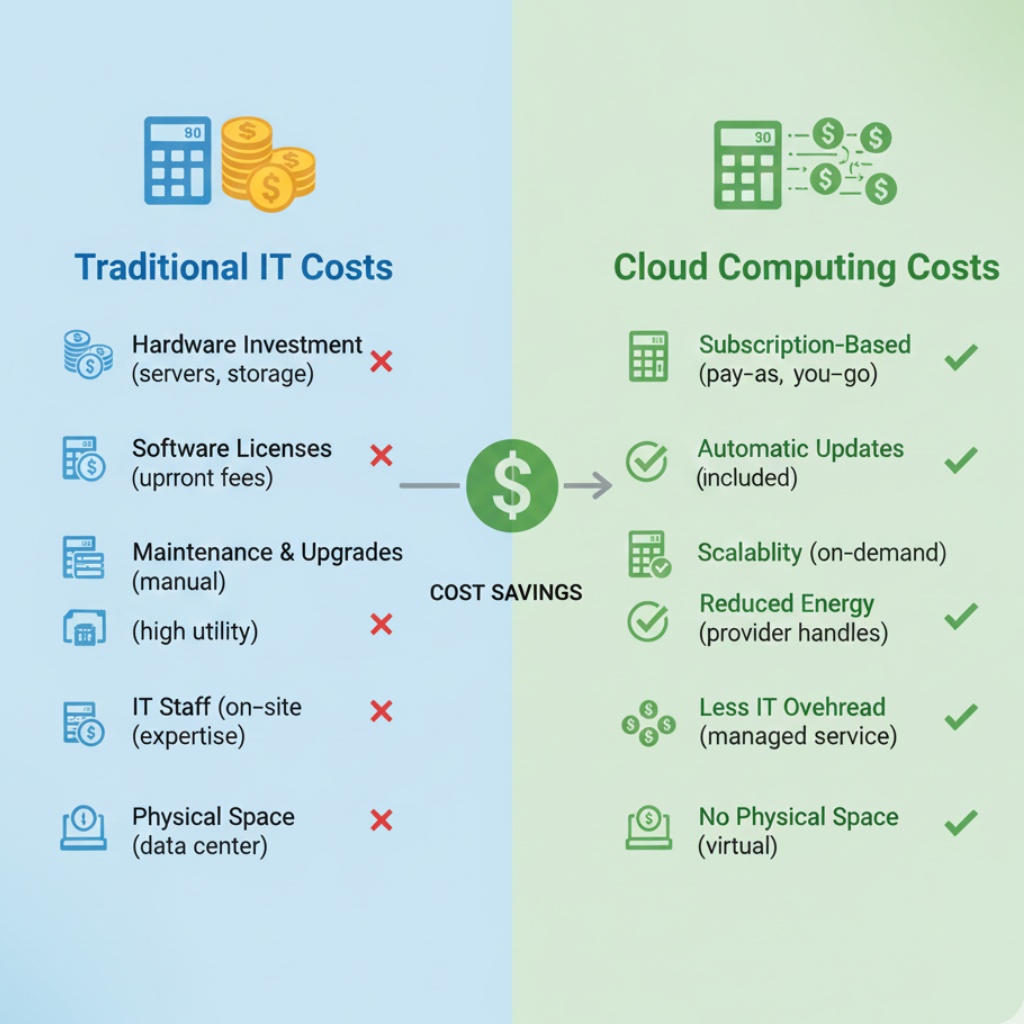
Here’s what gets small businesses: the advertised price is never the real price.
Advertised: “Starting at $6/user/month!” Reality: $6 for storage + $12 for email + $15 for project management + $30 for accounting = $63/user/month minimum.
Then add:
- Extra storage when someone fills up their quota
- Premium support when something breaks
- Integration tools to connect everything
- That one specialized app you forgot about
I helped a 15-person agency budget for cloud tools last year. They expected $1,200/month. Actual cost? $2,400/month once we added everything they actually needed.
Not saying don’t do it. Just saying budget 2x what you think it’ll cost. You’ll probably hit 1.5x and feel smart.
Security: The Thing You’re Probably Not Thinking About
Look, I’ve got to mention this. Cloud services are generally more secure than your office server. But they’re only secure if you set them up right.
What actually matters:
- Turn on two-factor authentication. Everywhere. No exceptions.
- Set up proper file permissions (not “everyone can edit everything”)
- Train your team not to share passwords or leave accounts logged in
- Have a real backup strategy (yes, even for cloud files)
That marketing agency I mentioned at the start? They had everything in the cloud but no 2FA. Someone’s email got compromised. The hacker had access to everything for three days before anyone noticed.
Don’t be that agency.
When Cloud Computing Doesn’t Make Sense
Real talk: Sometimes the cloud isn’t the answer.
Skip it if:
- Your internet is unreliable (can’t access cloud files without internet)
- You handle extremely sensitive data with strict compliance requirements
- You’ve got legacy software that only runs on specific hardware
- Your team is 100% in-office with zero remote work plans
I worked with a manufacturing company that insisted on moving everything to the cloud. Their shop floor had spotty internet. Workers couldn’t access production schedules when the WiFi dropped. They ended up keeping critical systems on-premise and only moving admin stuff to the cloud.
Know your constraints before you jump in.
The Hybrid Approach (What Most Small Businesses Actually Do)
Here’s what actually happens in the real world: You don’t go all-in on cloud or stay all on-premise. You mix it.
Typical hybrid setup:
- Email and communication: Cloud (Google Workspace or Microsoft 365)
- File storage: Mostly cloud (Google Drive), some local for working files
- Accounting: Cloud (QuickBooks Online)
- Specialized industry software: Still on-premise or local installs
- Customer data: Depends on compliance requirements
This is fine. Don’t let anyone tell you that you need to be 100% cloud to be “modern.” Do what works for your business.
Getting Started: First Steps That Actually Matter
If I’m sitting across from you right now, here’s what I’d tell you to do first:
- Audit your current setup. Write down every service, tool, and server you’re using. Yes, all of them.
- Talk to your team. Find out what’s actually painful right now. Don’t assume you know.
- Start with one thing. Move email or file storage first. Not everything at once.
- Budget 2x time and money. Seriously. You’ll need it.
- Document everything. Future you will thank present you.
- Plan for training. Your team won’t magically know how to use new tools.
Common Questions (The Ones People Actually Ask)
“What if the internet goes down?” You can’t access cloud files without internet. This is the tradeoff. Some services offer offline access (Google Drive can sync files locally), but plan for internet outages if that’s common in your area.
“How do I know my data is safe?” Major cloud providers (Google, Microsoft, AWS) have better security than you can probably afford on-premise. But you’re trusting them. Read their security docs. Turn on all the security features. Have a backup plan.
“Can I switch providers later?” Technically yes. Practically? It’s a pain. Pick carefully upfront. Switching costs (in time and money) are higher than you’d think.
“What about GDPR and compliance?” Talk to a lawyer. Seriously. Different industries have different requirements. Cloud providers offer compliance tools, but you’re responsible for using them correctly.
For businesses exploring modern tech strategies, understanding cloud infrastructure often goes hand-in-hand with other innovations like AI tools for data analysis and predictive analytics, which increasingly rely on cloud computing resources for processing power and scalability.
Final Thoughts
Cloud computing for small businesses isn’t revolutionary. It’s practical. You’re swapping capital expenses for operating expenses. Trading hardware management for vendor management.
Is it worth it? For most small businesses, yes. But go in with your eyes open.
The agencies and shops that do this well start small, plan carefully, and don’t rush. The ones that struggle try to change everything overnight and wonder why their team is confused and frustrated.
I’ve been on both sides of this. Learn from my mistakes. Or make your own, that works too.
Just for the love of all that’s holy, turn on two-factor authentication.
Related Resources:
Have questions about cloud migration? Drop them in the comments. I’ll answer based on what I’ve actually seen work (or spectacularly fail).