AI for Data Analysis: What Actually Works (And What Doesn’t)
So you’ve got a spreadsheet with 500,000 rows, and your manager wants “insights by Friday.” Excel crashed three times already. You’re Googling “AI data analysis tools” at 2 AM.
Been there. Done that. Got the war stories.
Here’s what I’ve learned after spending two years building data pipelines and watching AI tools promise miracles while delivering… mixed results.
This article is part of our comprehensive guide on Artificial Intelligence and Machine Learning. For the full guide covering everything from basics to advanced applications, check out the main resource.
Why AI for Data Analysis? (The Real Reasons)
Look, traditional data analysis isn’t dead. SQL queries and pivot tables still work fine. But here’s what actually happens when you’re dealing with modern data:
Your dataset has 47 columns. Half of them are poorly named. A quarter have missing values. And you need to find patterns that might take a human analyst three weeks to spot.
I spent four days last month manually cleaning a customer dataset before I could even start analyzing it. Four. Days. An AI-powered tool did the same cleaning in 20 minutes. Was it perfect? No. Did it save me 90% of the grunt work? Absolutely.
Real talk: AI doesn’t replace data analysts. It handles the boring stuff so you can focus on the actual thinking.
What AI Actually Does for Data Analysis
Let me break down what’s useful versus what’s marketing hype.
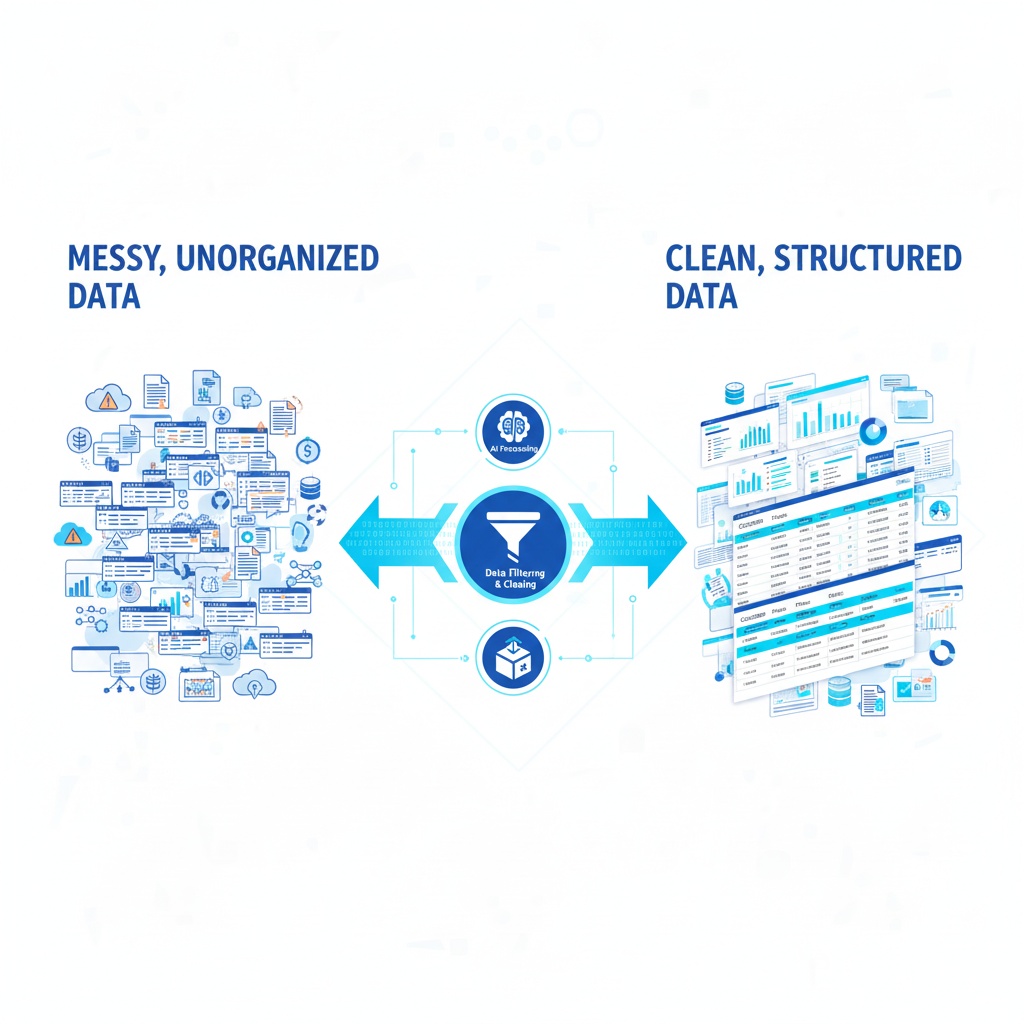
Data Cleaning (This Actually Saves Time)
AI excels at spotting inconsistencies. Things like:
- Finding duplicate entries that aren’t exact matches
- Detecting outliers that might be data entry errors
- Standardizing formats across messy datasets
- Filling in missing values based on patterns
I used pandas-profiling with some basic ML models to clean a sales dataset. It flagged 3,200 entries where the postal codes didn’t match the city names. Turns out someone had been copying data wrong for months. Would I have caught that manually? Eventually. After how long? Don’t want to think about it.
Pattern Recognition (Where It Gets Interesting)
Here’s where AI starts earning its keep. Traditional analysis shows you what happened. AI can show you patterns you didn’t know to look for.
Last quarter, I ran clustering algorithms on user behavior data. Expected to find 3-4 user segments based on our personas. The AI found 7 distinct patterns, including one group that used our product in a way we never anticipated. That insight changed our roadmap.
Tools I’ve used for this:
- scikit-learn (Python, free) – clustering and classification
- TensorFlow (overkill for most stuff, but powerful)
- Tableau with AI features (expensive but user-friendly)
Predictive Analysis (Use With Caution)
This is where people get excited and make bad decisions.
Yes, AI can predict trends. No, it’s not magic. I’ve seen teams build elaborate ML models to predict customer churn, only to realize the model was 55% accurate. A coin flip is 50%. That extra 5% cost three months of development time.
What works: Predicting things with clear historical patterns (sales seasonality, server load, inventory needs).
What doesn’t: Predicting human behavior in complex scenarios. People are weird. AI struggles with weird.
If you’re interested in how AI makes predictions, check out our guide on Predictive Analytics with AI for a deeper dive into the methods and pitfalls.
Tools I’ve Actually Used (The Good and The Bad)
Python Libraries (My Go-To Stack)
Pandas – The foundation. Not technically AI, but you’ll use it alongside everything else. Version 2.0+ fixed a lot of memory issues the old versions had.
NumPy – Fast numerical operations. Pairs with pandas. If you’re processing millions of rows, you need this.
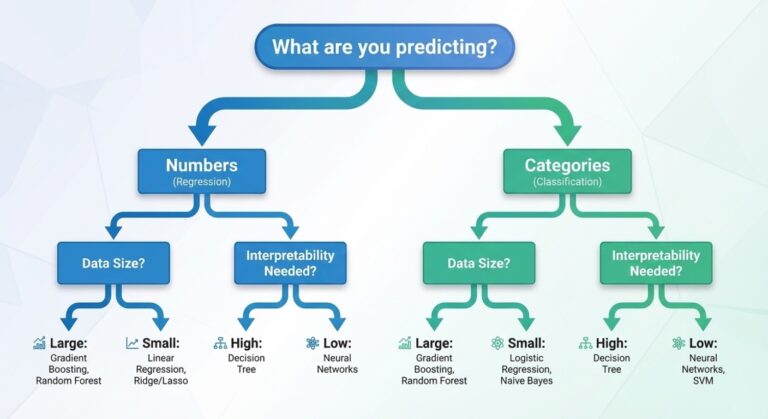
scikit-learn – Machine learning made relatively simple. I’ve used it for regression analysis, classification, and clustering. Documentation is solid. Learning curve exists but isn’t brutal.
Auto-sklearn – This one automates the model selection process. I was skeptical. Then it beat my hand-tuned model by 8% accuracy. Still annoyed about that.
Cloud AI Services (When You Don’t Want to Code)
Google Cloud AutoML – Tried it for image classification in a side project. Worked surprisingly well. Expensive if you’re not careful with API calls. Pro tip: set billing alerts. Trust me.
AWS SageMaker – More flexible than Google’s offering, but the interface feels like it was designed by someone who hates humans. Powerful once you figure it out. Budget a week for the learning curve.
Azure Machine Learning – Middle ground between Google and AWS. If you’re already in the Microsoft ecosystem, it integrates nicely. If not, probably skip it.
Specialized Tools (For Specific Use Cases)
RapidMiner – Drag and drop ML workflows. Great for non-programmers. I used it to train marketing folks on basic ML concepts. Limitations become obvious once you want to do anything complex.
DataRobot – Enterprise-grade automated ML. Saw it at a previous company. Impressive but costs more than my first car. Only worth it if you’re analyzing data at serious scale.
For more tool options, especially if you’re just starting out, our article on AI Tools for Beginners covers free and low-cost options to experiment with.
Real World Example: Sales Data Analysis
Let me walk you through an actual project from last year. No theory, just what happened.
The Problem: E-commerce company. 18 months of sales data. They wanted to understand why some products sold well in certain regions and flopped in others.
What I Did:
First, I cleaned the data using pandas. Found issues immediately – product categories were inconsistent, some regions had data entry errors, dates were formatted three different ways. Spent two days on this alone.
Then I used scikit-learn’s clustering algorithm (DBSCAN, specifically) to group similar sales patterns. Expected regional differences. Got those, but also found something weird: products with blue packaging sold 23% better in coastal cities. Products with red packaging did better inland.
Nobody asked about packaging colors. The AI just found the pattern.
The Gotcha: The model initially suggested we should only sell blue products on the coasts. This is where human judgment matters. We dug deeper and found the real reason – coastal stores displayed products differently due to store layout constraints. Blue products happened to be smaller and fit the displays better.
AI found the correlation. We found the causation. Both were necessary.
Common Mistakes (I’ve Made Most of These)
Trusting the Model Too Much
Built a customer lifetime value prediction model once. It said a particular customer segment was worth 3x what they actually turned out to be worth. Cost the company real money.
Why did it fail? The training data came from a period when we were running an unsustainable discount program. The model learned the wrong patterns.
Lesson: Always validate AI predictions against business logic and domain expertise.
Not Cleaning Data First
Garbage in, garbage out. This isn’t just a saying.
I once fed a ML model data that included test accounts, bot traffic, and internal employee usage. The predictions were hilariously wrong. Three days of debugging later, I realized the issue was in the data prep stage, not the model itself.
Overcomplicating Things
You don’t need neural networks to analyze your quarterly sales data. You probably don’t even need machine learning.
I’ve seen teams spend months building complex AI systems when a well-written SQL query and some basic statistics would have answered their questions in a week.
Start simple. Add complexity only when necessary.
Want to understand the basics before diving into AI? Check out Machine Learning Basics to build a solid foundation.
When You Actually Need AI (And When You Don’t)
Use AI when:
- You’re analyzing huge datasets (millions of rows)
- You need to find patterns humans might miss
- You’re doing repetitive analysis that could be automated
- You have clear success metrics and good historical data
Skip AI when:
- Your dataset is small (under 10,000 rows)
- You need to explain every decision to stakeholders
- You don’t have clean, reliable data
- A simple analysis would answer your question
Getting Started (Practical Steps)
If you’re ready to try AI for data analysis, here’s what I’d do:
- Start with Python and pandas. Free, well-documented, huge community. Even if you end up using other tools, understanding pandas helps everywhere.
- Take a real dataset you already have. Don’t use textbook examples. Use your actual messy, annoying data. You’ll learn more from the frustration.
- Try scikit-learn for your first ML project. Pick one algorithm (I’d suggest k-means clustering or linear regression) and actually implement it. Don’t just read about it.
- Expect to fail. My first three ML models were terrible. The fourth one was mediocre. The eighth one was actually useful.
For a broader understanding of how AI fits into the bigger picture, including its applications beyond data analysis, see our overview of Types of Artificial Intelligence.
The Honest Truth About AI Data Analysis
It’s useful. It’s not magic.
I’ve saved hundreds of hours using AI tools for data analysis. I’ve also wasted time on projects where a simple spreadsheet would have worked better.
The key is knowing when to use it. And accepting that you’ll spend more time on data cleaning and validation than you will on the actual AI part. That ratio is usually 70% data prep, 20% modeling, 10% interpretation.
Is it worth learning? If you work with data regularly, yes. But manage your expectations. AI won’t solve bad data collection, unclear business questions, or lack of domain expertise. It’s a tool, not a replacement for thinking.
As AI continues to evolve, we’re seeing it transform multiple industries. For insights into where this technology is heading, read about the Future of Artificial Intelligence.
Related Articles
Explore more about AI and its applications:
- Artificial Intelligence and Machine Learning – Complete guide to AI fundamentals and applications
- Machine Learning Basics – Essential concepts for getting started
- AI Algorithms You Should Know – Key algorithms explained
- Predictive Analytics with AI – Deep dive into forecasting methods
- AI Tools for Beginners – Starter-friendly platforms
- Deep Learning Explained – Advanced AI techniques
- Challenges in AI Development – What makes AI difficult