AI in Smart Homes: What Actually Works (And What’s Still Frustrating)
I’ve got three smart speakers in my apartment. Two of them are unplugged.
Here’s the thing about AI in smart homes: the demos look amazing, the reality is… mixed. I’ve spent the last two years building out a “smart” home setup, and I’ve learned more from my failures than my successes. Some stuff genuinely makes life easier. Other stuff? It’s a solution looking for a problem.
Let me save you some money and frustration.
The Current State of Smart Home AI
Smart home AI has gotten seriously better since 2020. We’re not just talking about voice commands anymore (though those still screw up more than I’d like). We’re talking about actual pattern recognition, predictive automation, and systems that learn your habits.
But nobody tells you this: it’s still janky. You’ll spend hours troubleshooting why your lights won’t turn off at bedtime, only to find out your router decided to put your smart bulbs on a different subnet. Ask me how I know.
This article is part of our comprehensive guide on Artificial Intelligence and Machine Learning. For the full guide on AI applications across industries, visit the main page.
What AI Actually Does in Your Home
Voice Assistants (The Gateway Drug)
Alexa, Google Assistant, Siri. You probably have one already. The AI here is mostly natural language processing – understanding what you’re saying and figuring out what you want.
They work great for:
- Playing music (90% of what I use mine for)
- Setting timers while cooking
- Turning lights on/off
- Basic weather and news
They’re terrible at:
- Understanding context from previous questions
- Handling multiple people talking
- Working when your internet’s down (yes, really)
Real talk: I stopped trying to use voice commands for complex stuff. “Turn off the bedroom lights except the one by the door” sounds simple. It’s not. The assistant gets confused, you repeat yourself three times, and eventually you just use the app.
Learning Thermostats
This is where smart home AI actually shines. Nest, Ecobee, and others use machine learning to figure out when you’re home, when you’re sleeping, and what temperature you like.
I installed a Nest in 2023. Took about a week for it to learn my schedule. Now it drops the temperature at 11 PM (when I usually go to bed) and warms things up at 6:30 AM before I wake up. Never programmed any of this.
The catch: It learns slowly. If your schedule changes (like mine did when I switched jobs), you’ll have a few weeks of annoying adjustments before it catches up.
Energy savings? About 15% on my bill. Not life-changing, but it paid for itself in 18 months.
Smart Lighting (More Useful Than You’d Think)

I was skeptical about smart bulbs. “Just use a switch,” I thought. But the AI-powered automation changed my mind.
What Works
Motion sensors combined with AI scheduling. My hallway lights turn on automatically when I stumble to the kitchen at 2 AM, but only at 20% brightness so I don’t blind myself. During the day? Full brightness. The system figured this out on its own based on when I typically use that hallway.
Circadian lighting is another win. My bedroom lights automatically shift to warmer colors as it gets later, supposedly helping with sleep. Can’t prove it works, but it’s nice.
What Doesn’t Work
Voice control for specific brightness levels. “Set living room to 60%” gives me something between 40% and 80% depending on Alexa’s mood. I’ve given up and just use the app.
Color scenes are gimmicky. Yes, you can make your living room look like a nightclub. No, you won’t use it after the first week.
Security Systems with AI
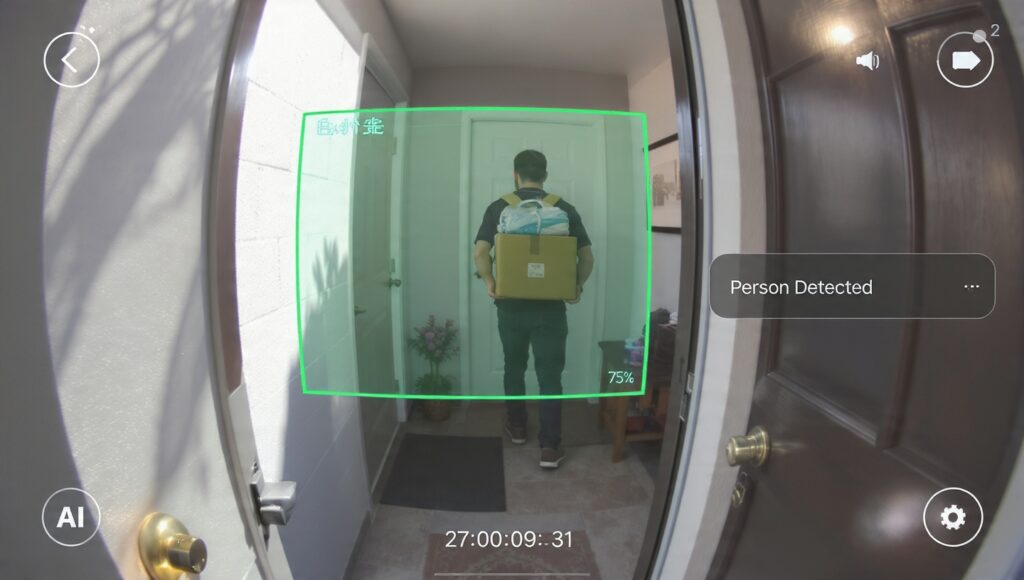
This is where computer vision comes into play. Modern security cameras don’t just record everything – they analyze it.
Person Detection vs. Motion Detection
My old security camera would alert me every time a car drove by. Seventeen notifications a day.
New AI-powered cameras distinguish between:
- People
- Animals
- Vehicles
- Packages
I only get alerts for people now. Game changer. Well, except when it mistakes my neighbor’s dog for a person. That happens more than Ring would like you to know.
Facial Recognition
Some systems can recognize family members and ignore them for alerts. In theory, this is brilliant. In practice, it only works about 70% of the time for me. My wife gets flagged as an “unknown person” maybe twice a week, usually when she’s wearing a hat or sunglasses.
The bigger issue? Privacy. I’m already uncomfortable with Amazon (who owns Ring) potentially having facial data of everyone who walks past my front door. You should think about that before enabling it.
Smart Home Hubs and Integration
Here’s what nobody tells beginners: your smart home devices probably don’t talk to each other natively. You need a hub.
I’ve tried:
- SmartThings (Samsung’s hub)
- Home Assistant (open source, runs on a Raspberry Pi)
- Apple HomeKit (if you’re all-in on Apple)
Home Assistant is what I settled on. It’s complicated to set up (took me a weekend), but once it’s running, it’s incredibly powerful. The AI automations are miles ahead of commercial options.
Example: My “leaving home” routine turns off all lights, drops the thermostat, arms the security system, and locks the door. But it only triggers if:
- My phone leaves the geofence
- No other phones are detected at home
- It’s between 7 AM and 10 PM (different routine at night)
That level of conditional logic isn’t possible with most commercial hubs.
Downside: You need to be comfortable with YAML config files and occasional troubleshooting. If that sounds annoying, stick with SmartThings.
The Robot Vacuum Situation
I have a Roomba with AI mapping. It’s genuinely useful, but not for the reasons you’d think.
What’s good: It learns your floor plan, avoids obstacles, and knows which rooms you clean most often. Mine automatically does the kitchen every morning after I make coffee. Didn’t program that – it figured out there’s always crumbs at 8 AM.
What’s bad: It still gets stuck under my couch. Every. Single. Time. The “advanced AI” apparently can’t remember that it’s gotten stuck in the exact same spot twelve times. Also, if you leave a sock on the floor, prepare for disaster.
For more on how AI powers robotics, check out our detailed guide.
Energy Management AI
Some smart home systems now predict your energy usage and optimize accordingly. My solar panel system (paired with a Tesla Powerwall) uses AI to:
- Predict tomorrow’s weather
- Estimate my energy needs
- Decide when to use battery vs. grid power
It’s saved me about $40/month. Not huge, but it adds up. The cool part is watching it learn. In summer, it now knows I’ll blast the AC from 3-6 PM and pre-cools the house using cheaper morning electricity.
What Doesn’t Work (Yet)
Let’s be honest about the limitations.
Context Understanding Is Still Bad
You can’t have a real conversation with a smart home. Try this:
You: “Turn on the living room lights” Assistant: turns on lights You: “Actually, make them dimmer” Assistant: “Sorry, I don’t understand”
It forgets what you just talked about. Frustrating.
Reliability Issues
My smart home works 95% of the time. That 5% is annoying enough that I keep regular light switches as backup. When your Wi-Fi router restarts, your whole smart home becomes… dumb.
Last month, AWS had an outage. Half my devices stopped working. That’s the risk of cloud-dependent systems.
Privacy Trade-offs
Every device with a microphone or camera is potentially listening and watching. Amazon, Google, and Apple all admit to having humans review some voice recordings to “improve the service.”
I’ve put smart speakers in common areas only. Bedroom and bathroom? No thanks.
Building Your First Smart Home Setup
If you’re starting from scratch, here’s what I’d recommend (based on painful experience):
Start small:
- Smart speaker (Google or Amazon, $30-50)
- Smart bulbs for one room (Philips Hue, $50)
- Smart thermostat (Nest or Ecobee, $200)
Get comfortable with those before buying seventeen smart outlets and a robot vacuum. Trust me on this.
Pick an ecosystem early. Mixing Apple, Google, and Amazon devices leads to compatibility hell. I learned this the expensive way.
Budget for a good router. Your current router probably can’t handle 30+ smart devices. I upgraded to a mesh network system (Eero) and it fixed 90% of my connectivity issues.
For beginners looking to experiment with AI before committing to hardware, check out our guide to AI tools for beginners.
The Future of Smart Home AI
Looking ahead, here’s what’s actually promising (not just marketing hype):
Predictive maintenance: Your HVAC system telling you it needs a filter change before it breaks down. Some systems already do this.
Energy grid integration: Your home automatically using less power during peak hours to save money and help the grid.
Health monitoring: Detecting falls for elderly residents, or noticing unusual patterns that might indicate health issues.
The technology for all this exists. The challenge is making it reliable and privacy-respecting. We’re not there yet.
Want to know where AI is heading overall? Read our take on the future of artificial intelligence.
My Honest Recommendation
Should you build a smart home? Depends.
Get a smart home if:
- You’re comfortable troubleshooting tech issues
- You value convenience over privacy (or know how to limit data sharing)
- You’re willing to spend time on setup and maintenance
- You own your home (landlords often prohibit smart devices)
Skip it if:
- You just want things to work without thinking about them
- You’re very privacy-conscious
- You’re renting and can’t install devices
- You’re not ready to become your family’s tech support
My setup has genuinely improved my daily life, but I’ve also spent probably 40 hours over two years fixing, updating, and optimizing things. That’s the real cost nobody mentions.
Start with one or two devices, see how you like it, and expand slowly. Don’t do what I did and buy $800 worth of smart home gear in one weekend. Half of it’s still in boxes.
Final Thoughts
Smart home AI is getting better fast. The stuff that works really well (thermostats, security cameras, lighting automation) is worth the investment. The stuff that’s still janky (voice assistants understanding context, perfect device compatibility) will improve, but we’re not there yet.
My advice? Be realistic about expectations, start small, and remember: you can always go back to dumb switches. I’ve got a drawer full of regular light bulbs as proof.
Got questions about setting up your smart home? Hit me up in the comments. I’ve probably made whatever mistake you’re about to make.