Collaboration Tools for Remote Work: What Actually Works (And What Doesn’t)
This article is part of our comprehensive guide on Software, Apps, and Productivity Tools. For the full guide on productivity software, visit the main resource.
Look, I’ve been working remotely since 2019, and I’ve tried just about every collaboration tool that promises to “revolutionize team communication.” Spoiler alert: most of them overcomplicate things.
But here’s what I’ve learned after managing distributed teams across three time zones and watching countless tools come and go: the right collaboration software isn’t about features. It’s about reducing friction. If your team spends more time figuring out how to use the tool than actually collaborating, you’ve already lost.
Why Remote Collaboration Tools Actually Matter
Back in 2020, everyone suddenly discovered remote work. Companies rushed to adopt Zoom, Slack, and whatever else they could find. Fast forward to now, and we’re dealing with the aftermath: notification fatigue, meeting overload, and teams that somehow feel less connected despite being “always online.”
The thing is, collaboration tools should solve problems, not create new ones. When I joined my current company, we were using seven different apps for communication. Seven. Slack for chats, email for formal stuff, Zoom for meetings, Google Meet for quick calls, Notion for docs, Trello for tasks, and some obscure tool the dev team insisted on.
It was chaos.
What Makes a Good Remote Collaboration Tool
After years of trial and error (mostly error), I’ve figured out what actually matters:
Real-time communication that doesn’t suck. You need instant messaging that works. Not “works most of the time” or “works if you restart the app.” Just works. I’ve lost count of how many times Slack has eaten my messages or Teams has frozen mid-conversation.

Video calls that people don’t dread. If your team groans every time someone suggests a video call, your tool is the problem. Good video software should be so seamless that you forget you’re not in the same room. Zoom gets this right most of the time. Google Meet… less so.
Document collaboration without the version hell. Remember emailing Word docs back and forth with filenames like “Project_Final_v3_ACTUALFINAL_use_this_one.docx”? Yeah, we’re past that. Tools like Notion and Google Workspace solved this years ago. If you’re still doing it, stop.
Task management that teams actually use. I’ve seen companies spend thousands on fancy project management software that nobody touches because it’s too complicated. The best task tool is the one your team will actually open every day. For us, that’s Asana. For others, it might be something simpler.
The Tools I Actually Recommend (With Caveats)

Slack: Still the King, Despite Its Flaws
I have a love-hate relationship with Slack. It’s bloated, it’s expensive, and it’s become a notification nightmare. But it’s still the best chat tool for remote teams.
What works: Channels keep conversations organized. Integrations with basically everything. Search that actually finds stuff (usually). Threading that prevents chat chaos (when people use it correctly, which they won’t).
What doesn’t: The notification system is aggressive. Threads confuse half your team. It’s easy to miss important messages in busy channels. And holy hell, the pricing once you hit 10+ people.
Pro tip: Set up channel naming conventions from day one. We use prefixes like #proj- for projects, #team- for team channels, and #random- for everything else. Saved us from having 50 channels called variations of “marketing stuff.”
Zoom: For When Video Actually Matters
I know everyone’s tired of Zoom, but it’s still the most reliable video tool I’ve used. Google Meet is free and decent, but it lacks features. Microsoft Teams tries to do everything and ends up being mediocre at all of it.
Zoom just works. The screen sharing is smooth, the audio quality is consistent, and breakout rooms (when you need them) are simple.
But here’s the thing nobody tells you: you don’t need video calls as much as you think. We cut our weekly video meetings from 12 hours to 4 hours and productivity went up. Use async communication when possible. Save video for when you actually need face-to-face interaction.
Notion: The Doc Tool That Finally Makes Sense
I’ve used Google Docs, Confluence, SharePoint (god help me), and a dozen others. Notion is the first one that clicked for our entire team.
It’s not perfect. The learning curve is steeper than Google Docs. The offline mode is… questionable. And it can get slow with large databases.
But the flexibility is worth it. We use it for meeting notes, project documentation, team wikis, and even lightweight project tracking. Everything’s in one place with a consistent structure. No more hunting through Drive folders for that doc someone shared three months ago.
Loom: The Async Communication Game Changer
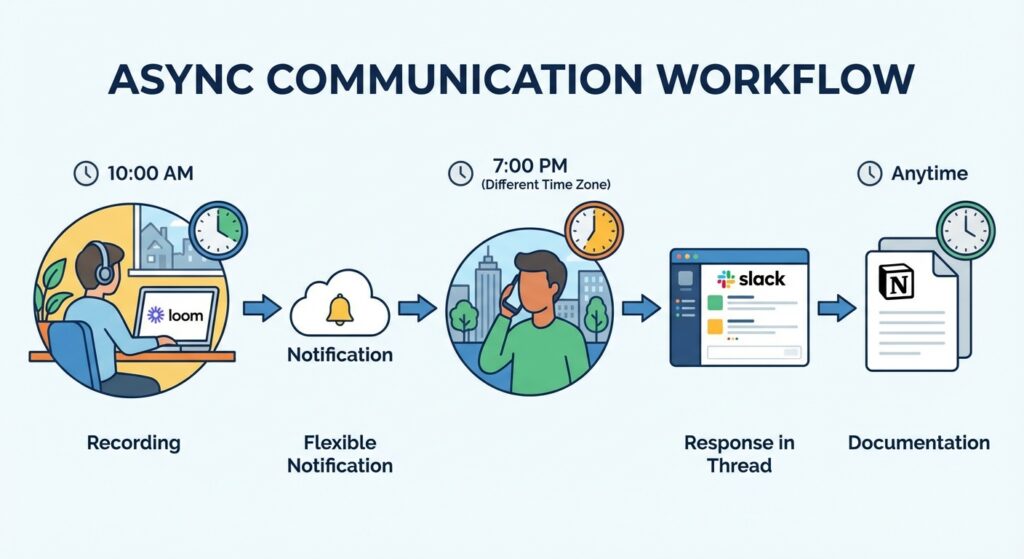
This one’s newer to our stack, but it’s been a revelation. Instead of scheduling a 30-minute call to explain something, I record a 5-minute Loom video. The person watches it when convenient, comments with questions, and we’re done.
It’s particularly great for code reviews, design feedback, and training new team members. I can show exactly what I mean instead of typing out lengthy explanations.
Downside? Video files eat storage fast, and not everyone is comfortable recording themselves. But for technical explanations, it’s gold.
Tools That Didn’t Work For Us (Your Mileage May Vary)
Microsoft Teams. We tried. We really did. But the UX is confusing, notifications are worse than Slack, and it’s just too bloated. If you’re already deep in the Microsoft ecosystem, maybe it makes sense. For us, it was friction.
Basecamp. Great philosophy, but the execution felt dated. We needed more flexibility than it offered. Good for small teams with simple projects, though.
Discord. Some dev teams swear by it. We found it too casual for work. The line between work chat and gaming app was too blurry.
Asana’s Timeline View. Okay, we love Asana for task management, but the timeline feature? Overcomplicated. We stick to boards and lists.
Building a Remote Collaboration Stack That Works
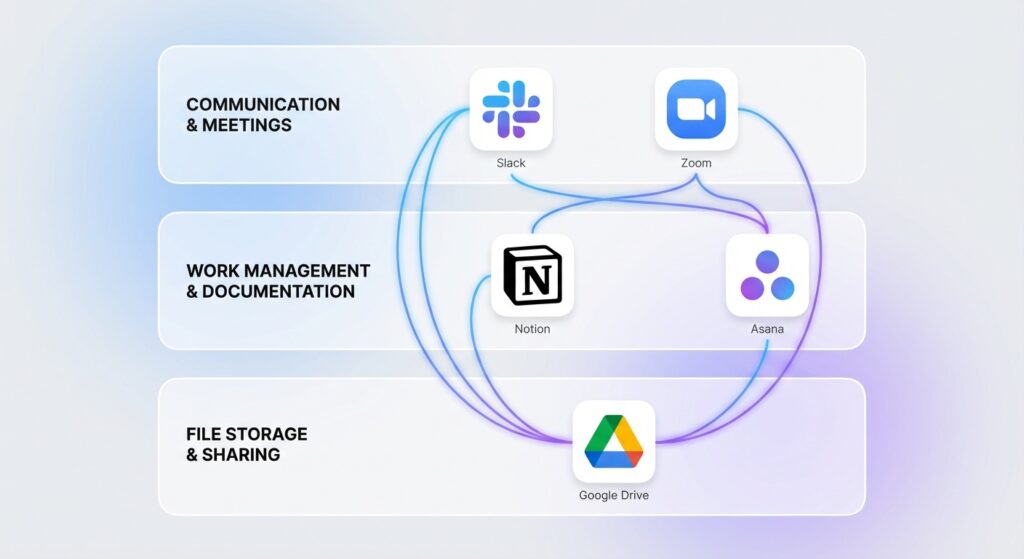
Here’s our current setup, which took two years to dial in:
- Slack for day-to-day chat
- Zoom for video calls (scheduled only, no “quick syncs”)
- Notion for all documentation
- Asana for task and project management
- Loom for async video explanations
- Google Drive for file storage (because Notion’s file handling is limited)
That’s it. Six tools. Each one has a clear purpose. No overlap.
The key is having rules about what goes where. Chat for quick questions. Notion for anything that needs to be referenced later. Asana for trackable tasks. Loom for explanations. Zoom for face-to-face.
Common Mistakes Teams Make
Using too many tools. More tools don’t make collaboration better. They make it fragmented. Consolidate ruthlessly.
No communication guidelines. Without rules about response times and what requires urgent attention, everything becomes urgent. We have a “no @ everyone unless the site is down” policy that’s saved our sanity.
Over-relying on sync meetings. Not everything needs a meeting. We moved to a “default async” approach and only meet when necessary. Game changer for productivity.
Ignoring time zones. With team members in California, New York, and London, we can’t schedule things assuming everyone’s available at the same time. We use calendar apps that show multiple time zones and avoid scheduling outside 10am-3pm EST.
Not documenting decisions. Slack messages disappear into the void. Important decisions should be documented in Notion with context. Future you will thank present you.
What About AI Collaboration Tools?
I’ll be real: most of the AI features being shoved into collaboration tools right now are gimmicks. Notion’s AI is occasionally useful for summarizing long docs. Slack’s AI search is hit or miss. Zoom’s AI summaries are… not great.
The one AI feature I actually use? Automation tools that connect our apps. Zapier and Make (formerly Integromat) save us hours by automating repetitive tasks between tools.
But AI meeting assistants, AI-generated responses, AI everything? Mostly solving problems nobody had.
The Real Cost of Remote Collaboration Tools
Let’s talk money, because this adds up fast:
- Slack Business: $15/user/month
- Zoom Pro: $15/user/month
- Notion Plus: $10/user/month
- Asana Premium: $13/user/month
- Google Workspace: $12/user/month
For a 10-person team, that’s $650/month or $7,800/year just for software. And that’s before you add specialty tools or enterprise plans.
Is it worth it? For us, yes. The productivity gains justify the cost. But I’ve seen companies waste money on premium productivity apps their team never uses. Start with free tiers, prove value, then upgrade.
Free Alternatives That Don’t Completely Suck
If budget’s tight, here’s what you can get away with:
- Slack free tier (limited message history, but functional)
- Google Meet (included with free Gmail)
- Notion free (generous free plan for small teams)
- Trello free (basic project tracking)
- Free cloud storage from Google Drive
You won’t get all the bells and whistles, but you can run a small remote team on this stack without spending a dime.
What’s Coming in 2025-2026
Based on what I’m seeing at tech companies and on productivity app trends, here’s what to expect:
More integrated platforms. Tools are consolidating. Notion is adding more project management. Slack is adding more docs. Everyone wants to be the “all-in-one” solution. This could be good or could lead to bloated software that does everything poorly.
Better async features. Video messaging, voice notes, and threaded conversations are getting smarter. The future of remote work is less synchronous, and tools are finally catching up.
Actual useful AI. Once the hype dies down, we’ll see AI features that actually help: better search, smart meeting summaries, automated task creation from conversations. But we’re not there yet.
My Actual Advice for Choosing Tools
Start with your biggest pain point. Don’t build a stack from scratch. Add tools one at a time as needs arise.
If your team struggles with real-time communication, fix that first with Slack or similar. If meetings are the problem, improve your video setup and establish meeting guidelines. If documentation is scattered, get a wiki solution like Notion.
Try tools for at least a month before judging them. What feels awkward at first often becomes natural with use. But also don’t fall for sunk cost fallacy. If something isn’t working after a fair trial, switch. We’ve abandoned probably a dozen tools over the years.
And most importantly: get team buy-in. The fanciest collaboration tool is worthless if your team won’t use it. Include them in the decision, provide training, and actually listen to their feedback.
Final Thoughts
Remote collaboration tools should fade into the background. The best tool is the one you don’t think about because it just works.
We’re still figuring this out. Our stack changes as tools improve and our needs evolve. What works for a 20-person startup won’t work for a 200-person company. What works for entrepreneurs might not work for students.
But the principles stay the same: keep it simple, reduce friction, and focus on what helps your team actually collaborate. Everything else is just noise.
Now go audit your company’s tool stack. I bet you’re paying for at least three things nobody uses.
Looking for more ways to optimize your remote workflow? Check out our guides on email management and focus tools to round out your productivity setup.