Best Smartphones for Photography: The Cameras That Actually Deliver
This article is part of our comprehensive guide on Smartphones and Mobile Technology. For more mobile insights, check out the full guide.
Look, I’ve been shooting with smartphones for years now, and I’ll tell you something nobody mentions in those glossy tech reviews: megapixels are a lie.
Well, not entirely. But last summer I watched a friend with a 108MP camera phone take worse photos than my wife’s three-year-old iPhone. Why? Because smartphone photography is about the entire system, not just one spec on a marketing sheet.
I’ve tested dozens of phones for photography over the past few years, and I’ve learned the hard way which features actually matter when you’re trying to capture your kid’s soccer game or get that perfect sunset shot. Some of these lessons cost me money. Let me save you the trouble.
What Actually Makes a Smartphone Camera Good?
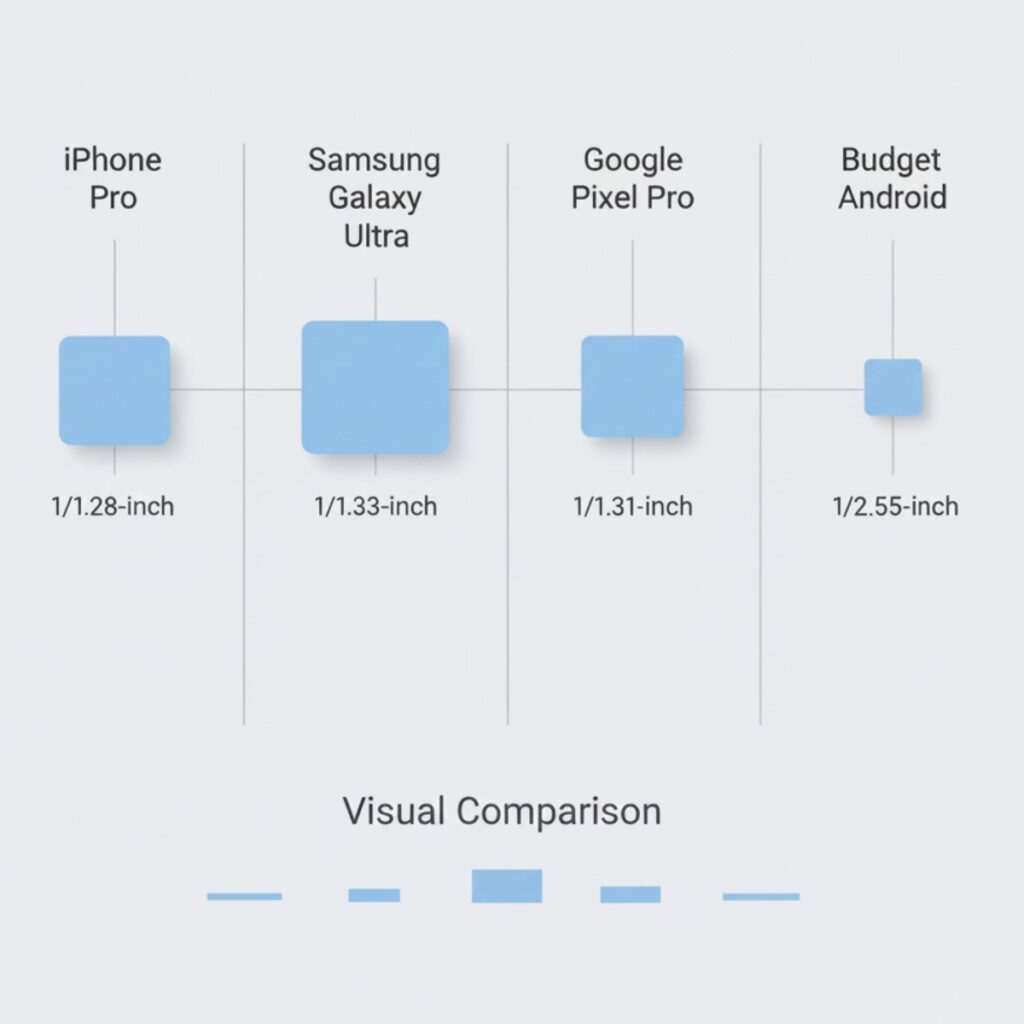
Here’s what the spec sheets won’t tell you: sensor size matters way more than megapixels. I learned this after buying a mid-range phone with a “64MP camera” that couldn’t handle low light to save its life. The photos looked great in bright daylight but turned into grainy messes indoors.
The three things that actually matter:
Sensor size. Bigger sensors capture more light. Period. This is physics, not marketing.
Computational photography. Google figured this out years ago. A good camera app with solid AI processing can beat better hardware.
Lens quality. Multiple lenses are nice, but I’d rather have one excellent lens than four mediocre ones.
Everything else is secondary. Yes, optical image stabilization helps. Sure, faster apertures are good. But those top three factors determine whether your photos look professional or like they were shot through a screen door.
The Current Champions (Early 2025)
iPhone 15 Pro Max: Still the Benchmark
I hate giving Apple credit (I’m an Android guy at heart), but damn if their camera system isn’t consistent. The 48MP main sensor combined with their computational photography produces photos that just work.
What impressed me: the ProRAW format. I shot a friend’s wedding reception with this phone as a backup camera, and the RAW files had enough dynamic range that I could recover blown-out highlights in post. That shouldn’t be possible from a phone sensor, but here we are.
The downside? The camera bump is ridiculous. And at $1,200+, you’re paying flagship prices. If you want similar performance for less, check out our guide to budget smartphones for alternatives.
Google Pixel 8 Pro: The Computational Powerhouse
Google’s been doing magic with camera software since the Pixel 2, and the 8 Pro continues that tradition. The hardware is good, not great. But the processing? That’s where Google shines.
I tested this in some truly awful lighting conditions (a dimly lit restaurant, basically a cave), and it produced cleaner images than phones with bigger sensors. The Night Sight mode is still unmatched. Magic Eraser is gimmicky but actually useful for removing photobombers.
Real talk: if you shoot a lot of photos of people, the Pixel’s skin tone rendering is the most natural I’ve seen. iPhones tend to oversaturate, Samsung goes too warm, but Pixel gets it right more often than not.
Samsung Galaxy S24 Ultra: The Spec Monster
Samsung throws everything at the wall. The S24 Ultra has a 200MP main sensor, multiple telephoto lenses, and enough camera features to confuse a professional photographer.
I spent a week with this phone, and here’s what I found: the 200MP mode is mostly useless. It creates massive files and doesn’t look noticeably better than the 50MP or 12MP modes for 99% of situations. But the telephoto capabilities are genuinely impressive. I got usable photos at 10x zoom, which is wild for a phone.
The problem? Samsung’s processing is aggressive. Colors are punched up, sharpening is heavy, and sometimes photos look more “digital” than real. Some people love this look. I don’t. But if you need serious zoom capability, nothing else comes close right now.
For a detailed comparison of different phone ecosystems, see our Android vs iOS comparison to understand which platform works better for your photography workflow.
The Budget Winners
Not everyone wants to drop $1,000 on a camera phone. I get it. I’ve shot with budget phones too, and some are surprisingly capable.
Google Pixel 7a – Last year’s model is still fantastic for photography. You get 90% of the Pixel 8 Pro’s camera quality for half the price. The main sensor is smaller, but Google’s processing compensates. I shot a local car show entirely with this phone and got comments on how professional the photos looked.
iPhone 13/14 – Don’t sleep on older iPhones. The camera quality didn’t magically get worse. The iPhone 13’s main camera is still better than most new mid-range phones. Buy one refurbished if you want Apple’s camera quality without the flagship price. We have a detailed guide on buying refurbished smartphones if you’re going this route.
Features That Actually Matter (And Ones That Don’t)
After shooting with probably 30 different phones, here’s what I’ve learned:
Must-Have Features:
Night mode. If a phone doesn’t have decent low-light capability, pass. Most of your photos aren’t happening in perfect lighting.
Optical image stabilization (OIS). Reduces blur from hand shake. This makes a bigger difference than you’d think, especially for video.
Multiple lenses with different focal lengths. I use the ultrawide constantly for architecture and landscapes. Telephoto is nice for portraits.
Nice-to-Have:
RAW shooting capability. If you edit photos, this gives you way more flexibility. But most people won’t use it.
Pro mode with manual controls. Same deal. Fun for enthusiasts, irrelevant for casual shooters.
Overhyped Nonsense:
Megapixel count above 50MP. Seriously, stop caring about this. It’s a marketing number. My 12MP camera takes better photos than most 64MP sensors.
“AI features” that add fake bokeh or smooth your skin. These usually look terrible. Natural is better.
Periscope zoom above 10x. The quality falls off a cliff beyond that point anyway. Just crop the photo later.
Real-World Photography Tests
I’m done with controlled lab tests. Here’s what matters in actual use:
Kids and Pets: You need fast autofocus and good burst mode. iPhones and recent Pixels handle this best. Samsung’s processing lag sometimes causes missed moments.
Low Light/Indoor: Pixel 8 Pro wins, hands down. iPhone is second. Everything else struggles.
Landscapes: Any flagship from the past two years will nail this in good light. Ultrawide lens quality matters more than the main sensor here.
Food Photos: Honestly? Most phones do fine. The real trick is learning to use natural light near windows. Your phone doesn’t matter as much as your lighting setup.
For more tips on getting the most from your smartphone camera, check out our detailed smartphone camera tips guide.
What About Video?
Short answer: iPhones still dominate for video. The stabilization and color science are just more consistent.
Longer answer: if you shoot a lot of video, get an iPhone or wait for the next Pixel (Google’s catching up). Samsung’s video looks good but needs more manual tweaking. Most Android phones have inconsistent video quality between different lenses, which is annoying when you’re trying to cut footage together.
I shot a short documentary entirely on an iPhone 14 Pro last year, and the footage held up surprisingly well when edited alongside footage from actual cameras. Would I recommend it for professional work? Depends on the project. But it’s capable.
The Ugly Truth About Smartphone Cameras
Here’s what no one wants to admit: any flagship phone from the past two years can take great photos in good lighting. The differences between them are mostly about edge cases and personal preference.
I’ve done blind tests with friends. When shown photos from different phones, people can’t reliably tell which is which unless it’s a challenging lighting situation. The “which camera is better” debates are mostly about tribal loyalties and spec sheet bragging rights.
What matters more than your phone? Learning basic photography principles. Composition. Light. Timing. I’ve seen incredible photos taken with budget phones and terrible photos taken with the latest flagships. The photographer matters way more than the gear.
Should You Upgrade for the Camera?
Only if your current phone is more than three years old, or if it’s genuinely bad at photography.
The improvements between phone generations are getting smaller. The jump from iPhone 14 to 15? Minimal for most people. Pixel 7 to Pixel 8? Nice improvements, not earth-shattering.
Save your money unless you’re coming from an old phone or your current camera is driving you crazy. Most of the time, learning to use your existing camera better will improve your photos more than buying new hardware.
Final Thoughts
If you forced me to pick one phone for photography right now, I’d probably go with the Pixel 8 Pro. It handles the widest range of situations well, the price is reasonable for a flagship, and the photos look natural without heavy processing.
But honestly? The best camera is the one you have with you. I’ve taken some of my favorite photos with whatever phone was in my pocket at the time. Don’t get too hung up on specs. Just shoot.
And for crying out loud, clean your lens before taking important photos. The number of smudgy photos I’ve seen from people with $1,200 phones…
Related Articles
Want to explore more smartphone topics? Check out these guides:
- Smartphones and Mobile Technology – Complete guide to everything mobile
- Flagship Smartphone Reviews – In-depth reviews of top phones
- Best Smartphones for Gaming – Gaming-focused phone recommendations
- Smartphone Buying Guide – How to choose the right phone for you