Android vs iOS: The Comparison Nobody Asked For (But You Need)
Look, I’ve been switching between Android and iOS for the past seven years. Not because I’m indecisive, but because I kept convincing myself the grass was greener. Spoiler: it’s not greaner anywhere. It’s just… different grass.
Last year, I switched from a Pixel 6 to an iPhone 14 Pro. Three months in, I almost threw it against a wall because I couldn’t figure out how to go back to the previous screen. (Turns out, you swipe from the left edge. Who knew?) Then I switched back to Android, and spent two weeks wondering why my group texts kept failing.
This is the reality nobody talks about in those clean comparison charts.
This article is part of our comprehensive guide on Smartphones and Mobile Technology. For more smartphone insights, check out the full guide.
What This Comparison Actually Covers
Here’s the thing about Android vs iOS comparisons: most of them are garbage. They’ll tell you iOS is “more secure” and Android is “more customizable” and call it a day. Useless.
I’m going to tell you what actually matters when you’re three months into ownership. The stuff that makes you want to switch back. The real differences that impact your day-to-day life.
We’ll cover:
- Real-world performance (not benchmark BS)
- The customization you’ll actually use
- App availability and quality differences
- Security that matters vs security theater
- Ecosystem lock-in (it’s worse than you think)
- The money situation
No fluff. Just what I’ve learned from actually using both platforms extensively.
The Performance Reality Check
iOS: Fast Until It Isn’t
iPhones are fast. Like, stupidly fast. My iPhone 14 Pro opened apps faster than my Pixel 6, no contest. Apple’s A16 chip is a beast.
But here’s what the benchmarks don’t show: iOS can feel weirdly sluggish in random places. Safari sometimes stutters when scrolling. The app switcher occasionally freezes. And don’t get me started on how iOS handles background apps.
I had this weird issue where Spotify would just… stop playing if I switched apps too aggressively. Turns out iOS is really aggressive about killing background processes to save battery. Great for battery life. Terrible when your podcast cuts out mid-episode.
Android: Inconsistent But Getting Better
Android’s performance is all over the place, and it depends entirely on what phone you buy. A Samsung Galaxy S24? Flies. A budget Android from some random manufacturer? Pray.
The Pixel 7 I’m using now is smooth 90% of the time. But then Chrome will randomly stutter, or the camera app will take three seconds to open. It’s better than it used to be, but it’s still not iPhone-consistent.
Real talk: if you’re buying a flagship smartphone, both platforms are fast enough. If you’re looking at budget options, iOS wins because even old iPhones stay fast.
Customization: How Much Do You Actually Care?
Android’s Freedom (That You Probably Won’t Use)
Android lets you do basically anything. Custom launchers, icon packs, widgets everywhere, default apps for everything. It’s amazing.
For about a week.
Then you realize you don’t actually care about having 47 home screen widgets. I spent hours setting up a perfect Nova Launcher setup with custom icon packs and KWGT widgets. Used it for two weeks. Then went back to the default launcher because I was tired of things breaking after updates.
But you know what I do use? The ability to set default apps. Being able to click a link and have it open in Firefox instead of Chrome? That matters. Installing apps from outside the Play Store? Actually useful.
iOS: Boring But It Works
iOS customization is… limited. You get widgets (finally), you can change your wallpaper, and that’s about it. No custom launchers. No icon packs. No fun.
But here’s the thing: it just works. Every time. No weird glitches. No launchers crashing. No icons randomly reverting to defaults after an update.
I’ve made peace with iOS’s limitations because I’ve stopped caring about having the perfect home screen. If you’re a tinkerer who loves customization, Android is your only choice. If you just want your phone to work, iOS’s simplicity is actually kind of nice.
App Situation: The Uncomfortable Truth
iOS Gets Apps First (And Better Versions)
This one hurts to admit, but it’s true: iOS apps are generally better. Developers prioritize iOS because iPhone users spend more money on apps. Cold, hard economics.
Instagram on iOS has features that take months to hit Android. Banking apps work better on iOS. Even Google’s own apps sometimes work better on iPhone, which is just embarrassing.
I tested this with Notion, Figma, and a few other apps I use daily. The iOS versions felt more polished. Smoother animations, fewer bugs, better tablet optimization.
Android’s Flexibility Matters More Than You Think
But Android lets you do things iOS never will. Torrenting apps? They exist. Emulators for old game systems? Easy. Apps that modify system behavior? Plenty of options.
YouTube Vanced (RIP) was the perfect example. Background playback, no ads, sponsor block built in. All stuff YouTube Premium charges for. Couldn’t exist on iOS.
For specific recommendations, check out our guide to top smartphone apps of 2025.
Security: Theater vs Reality
iOS Security: Good But Overhyped
Apple loves to brag about security. And yeah, iOS is secure. The walled garden approach means less malware, fewer sketchy apps.
But it’s not perfect. I’ve seen people get phished on iPhones. Social engineering works on any platform. And Apple’s reluctance to let you install from outside the App Store means you’re trusting Apple to vet everything. (They’ve let some sketchy stuff through.)
The biggest iOS security advantage? Updates. Every iPhone gets updates for like 5-7 years. That matters more than any fancy security chip.
Android Security: Better Than Its Reputation
Android’s gotten way better at security. Google Play Protect catches most malware before it hits your phone. And if you stick to the Play Store, you’re generally fine.
The problem is manufacturer updates. Samsung’s pretty good about updates now. But random Android manufacturers? Good luck getting security patches after year two.
For more on keeping your phone secure, read our smartphone security tips.
The Ecosystem Trap
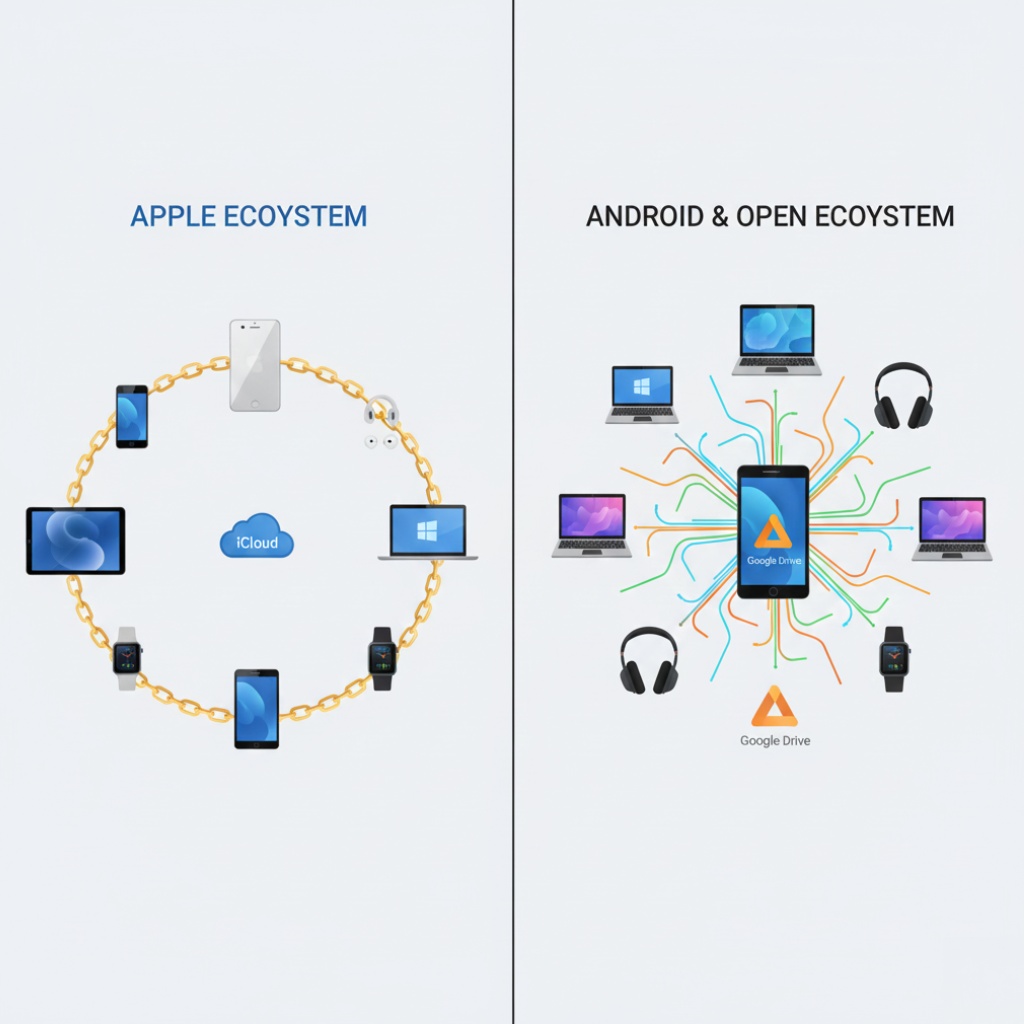
Apple’s Golden (or Handcuff) Ecosystem
This is where Apple gets you. I have an iPhone, MacBook, and AirPods. The integration is seamless and kind of magical.
Copy text on my phone, paste on my laptop. Phone calls through my MacBook speakers. AirPods switching between devices automatically. Handoff features. AirDrop.
It works so well that leaving feels impossible. That’s intentional.
Android’s Messier But More Open Approach
Android works with everything. My Pixel syncs with my Windows laptop, my Mac, my Linux desktop. It doesn’t care. That flexibility is powerful.
Google’s ecosystem (Drive, Photos, Gmail) works everywhere. I can access everything from any device, any operating system. That’s actually liberating.
But it’s not as polished. The integration isn’t as smooth. You’re stitching together services instead of getting one unified experience.
Money Talk: The Real Cost Comparison
iOS: Expensive Upfront, Better Resale
iPhones are expensive. The iPhone 15 Pro starts at $999. Even the regular iPhone 15 is $799. That’s rough.
But here’s what makes it easier: resale value. I sold my two-year-old iPhone 13 Pro for $600. That’s insane. You’ll never get that with Android.
And iPhones last longer. My mom is still using an iPhone XR from 2018. Still gets updates. Still runs fine. That’s value.
Android: Cheaper Options, Faster Depreciation
Android has options at every price point. You can get a solid phone for $300. Or spend $1,200 on a Galaxy S24 Ultra. Your choice.
But Android phones lose value fast. My Pixel 6 that cost $600 new? Worth maybe $200 after two years. Ouch.
For help choosing within your budget, check our smartphone buying guide.
What Actually Matters When Choosing
After switching back and forth multiple times, here’s what I’ve learned matters most:
Choose iOS if:
- You have other Apple devices (the ecosystem is real)
- You want consistent updates for 5+ years
- You value resale value
- You don’t care about customization
- You want the “just works” experience
Choose Android if:
- You hate feeling locked into one ecosystem
- You want to customize everything
- You need specific features iOS won’t allow
- You want more hardware options at different price points
- You use Google services heavily anyway
The Honest Conclusion Nobody Wants
There’s no winner. I’m sorry. Both platforms are great and both are annoying in different ways.
I’m currently using Android because I like the flexibility and I’m tired of Apple’s walled garden. But I miss AirDrop every single day. And the iPhone camera was noticeably better in low light.
My advice? If you’re happy with what you have, don’t switch. The grass isn’t greener. It’s just different grass, and you’ll spend three months learning where all the sprinklers are.
If you must switch, give it at least three months. The first month will be frustrating as hell. You’ll hate everything. By month three, you’ll have adjusted and can make an actual informed decision.
Or just keep both. I’m not your dad.
For more insights on choosing the right device for your needs, head back to our main Smartphones and Mobile Technology guide. And if you want to improve whichever phone you choose, check out our smartphone performance tips.